For iPhone, iPad and Mac

Your home.
All in one place.
And what’s coming up next.

Domalta is the digital logbook for homeowners. Start with whatever is on your mind right now – the heating, an invoice, the next service – and add the rest bit by bit. The app takes care of everything that comes up along the way: maintenance, repairs, supplies, documents and costs.

In English, German, French and Italian.

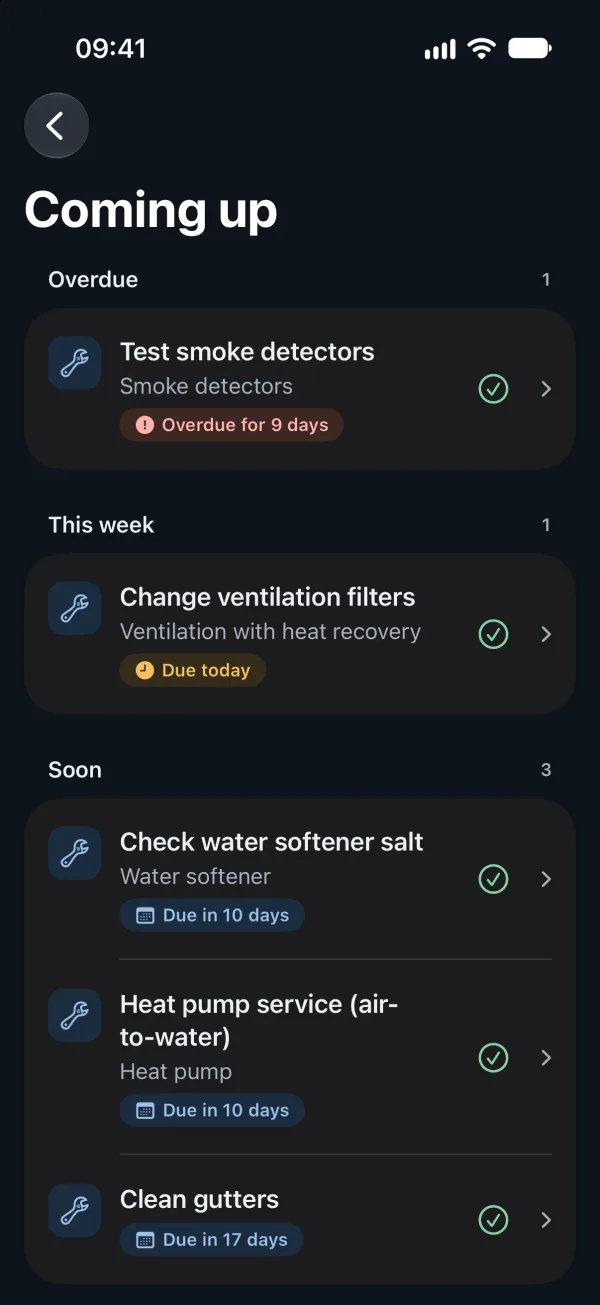
Domalta on the iPhone: “Coming up” with one overdue maintenance task, one for this week and three coming soon
No sign-up. No account, no login. No ads. No partner offers, no tracking. Your data in your iCloud. No server of our own.

01 / Home knowledge that stays

Less searching.
Remember in good time.

What colour is the kitchen wall? When did the chimney sweep last come? Where is the invoice for the heat pump? Domalta answers questions like these before you have to ask them.

01

Assets with rating plates.

Heating, water heater, solar panels and appliances with model, serial number, warranty and typical service life.

Record assets
02

Maintenance with reminders.

Swiss templates from heating service to combustion emissions check. “Done” records the company, costs and receipt.

Plan maintenance
03

Documents and costs.

Scan invoices, policies and contracts, search them and assign them to costs – value-preserving or value-enhancing.

File documents

Getting started · 4 videos

Ready to go
in two minutes.

Four short videos of around 30 seconds each walk you through the start – from the sample house to your first maintenance task.

The videos are in German.

Part 1 of 4 The sample house
Part 2 of 4 Your own house
Part 3 of 4 First asset from the rating plate
Part 4 of 4 First maintenance and reminder
The property as tiles: Maintenance with one overdue task, Repairs, Documents, Assets, Rooms, Stock, Meters, Projects, Costs and Management, each with its status

02 / Even for large houses

The whole property
at a glance.

Every part of your home is a tile – Maintenance, Repairs, Documents, Assets, Rooms, Stock, Meters, Projects, Costs and Management. Each one shows whether something is due; one tap opens the list behind it.

  • Overdue in red, due soon in orange – and always as text too.
  • Prefer everything on one page? Switch to the list with a single tap.
  • Search finds everything in all your properties, including text in scanned documents.
  • Back up meter readings with a photo of the display; projects with a start or quote deadline coming up appear under “Coming up”.
Tiles and list

03 / Look first, then get started

The sample house
shows you how.

On first launch you can open a fully filled-in sample house: with rooms, ten assets, maintenance, meters, documents and a project with quotes. Change whatever you like – and remove it once you set up your own home.

  • Everything in the sample house is made up.
  • It does not count towards the free limit.
  • Reminders are switched off there to begin with.
Getting started
The sample house “Sample detached house” in list view with picture, address and upcoming maintenance
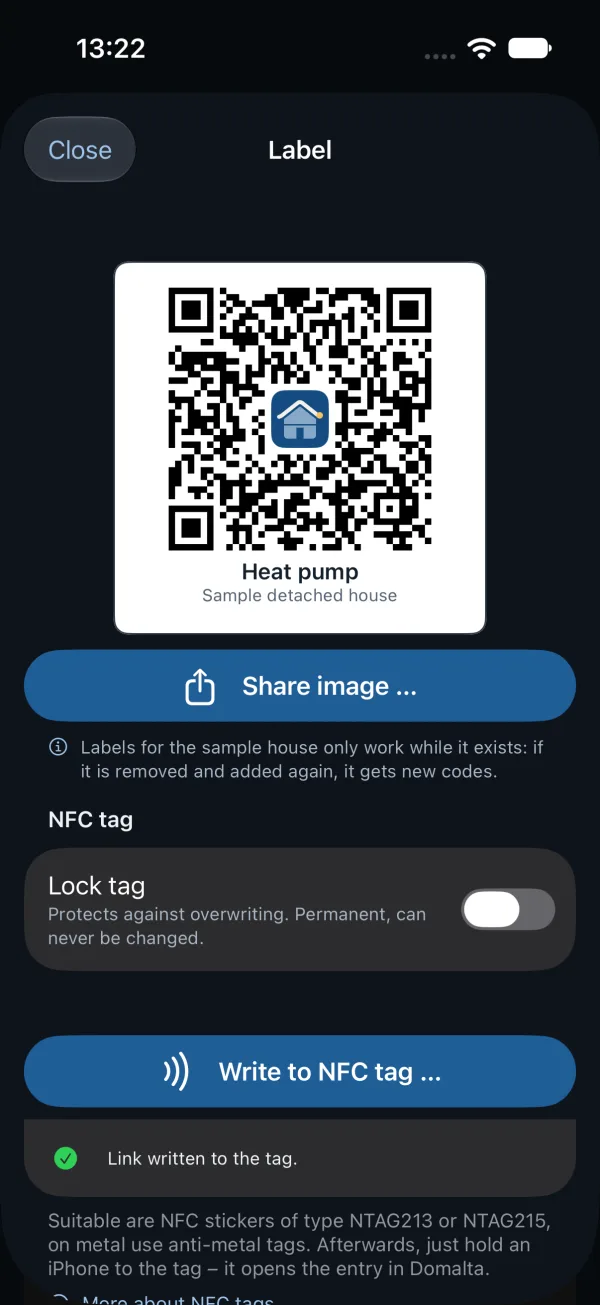
Label sheet for the heat pump with its QR code and the NFC tag section: “Write to NFC tag …” with the confirmation “Link written to the tag.”

04 / Right where it is

Your home knowledge.
Right where you need it.

The heat pump is due for a service? Hold your iPhone to the NFC tag or scan the QR label next to it – and there’s the model, past maintenance, the manual and the company that looks after it. Once the job is done, mark it as done right there and add the receipt.

  • At the meter: open the right meter and enter the reading, with a photo of the dial if you like.
  • At the supply shelf: check and adjust the stock of salt, filters or light bulbs.
  • Scan with the Camera app, right in Domalta or from Control Centre – even in a cellar without reception, as long as Domalta is installed and the entry is on the device.
  • Scanning and reading NFC tags is free; printing whole sheets, a CSV list for your own label printer and writing NFC tags come with Pro.
  • The code holds only a random link – nothing about your home – and it isn’t a key: anyone without access to your logbook sees none of it. Which labels fit is explained in the label guide.
QR labels and NFC

05 / Selling or letting

The home logbook
goes with the house.

When you sell or let, the new occupants get more than a PDF – they get the logbook itself: rooms, assets, maintenance, documents and photos for their own Domalta, ready to carry on. If you like, the home dossier comes along as a PDF, readable without Domalta too.

  • Costs and purchase price, insurance and notes stay with you by default.
  • Supplier contacts go along – so the newcomers know who services the heating.
  • Printed labels and NFC tags keep working for them.
  • Importing is free for them if it becomes their only property of their own and has no more than ten assets; beyond that they need Domalta Pro.
  • Buying a house yourself? Ask for the logbook – then you don’t start from scratch.
Handover to buyer or tenant
Handover sheet: what the new occupants receive and “What’s included?” with switches for costs and purchase price, insurance, notes and supplier contacts
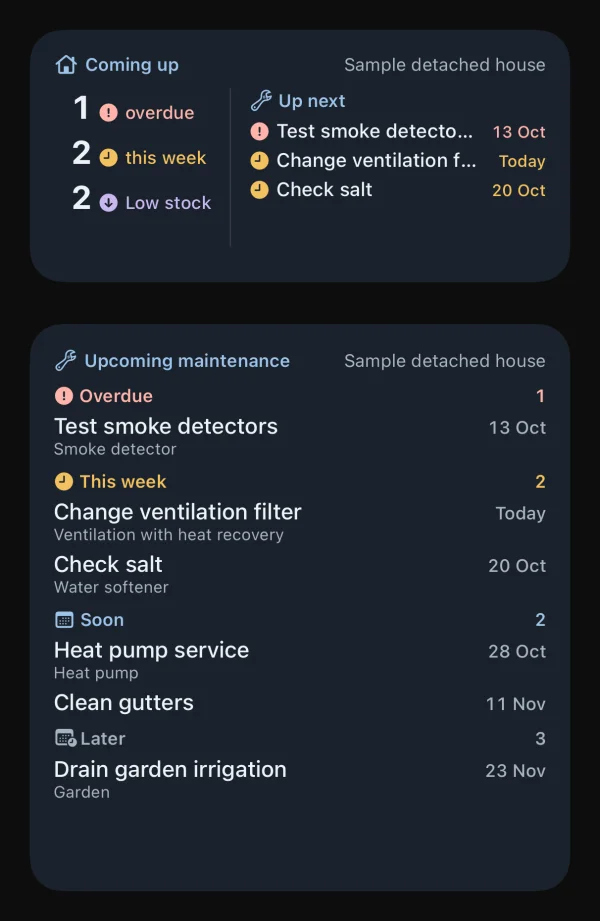
Two widgets: “Coming up” in medium with overdue, this-week and low-stock counts, below it “Upcoming maintenance” in large grouped by Overdue, This week, Soon and Later

06 / Without opening Domalta

Spotlight, Siri and widgets.
Always to hand.

Your home is there even when Domalta is closed.

  • Spotlight finds your entries – swipe down on the Home Screen or press ⌘-Space on the Mac. Notes, amounts and numbers stay out, and the index stays on the device.
  • Siri understands “What is coming up in Domalta” or “Refilled salt in Domalta” – no setup needed.
  • Widgets “Coming up”, “Upcoming maintenance” and “Stock” for the Home Screen and Lock Screen, extra large on iPad and Mac.
Widgets and control

07 / On all your devices

iPhone, iPad and Mac.
And the family.

01

Sync via iCloud.

Your data syncs through your own iCloud. Pull down – or press ⌘R on the Mac – to sync straight away; a small indicator at the bottom shows the progress.

Sync and archive
02

Look after it together.

Share a property with your partner or family – so they can edit, or read only.

Sharing
03

Home dossier as a PDF.

Everything important about your home in one document – for a sale, an inheritance, insurance or tradespeople.

Home dossier
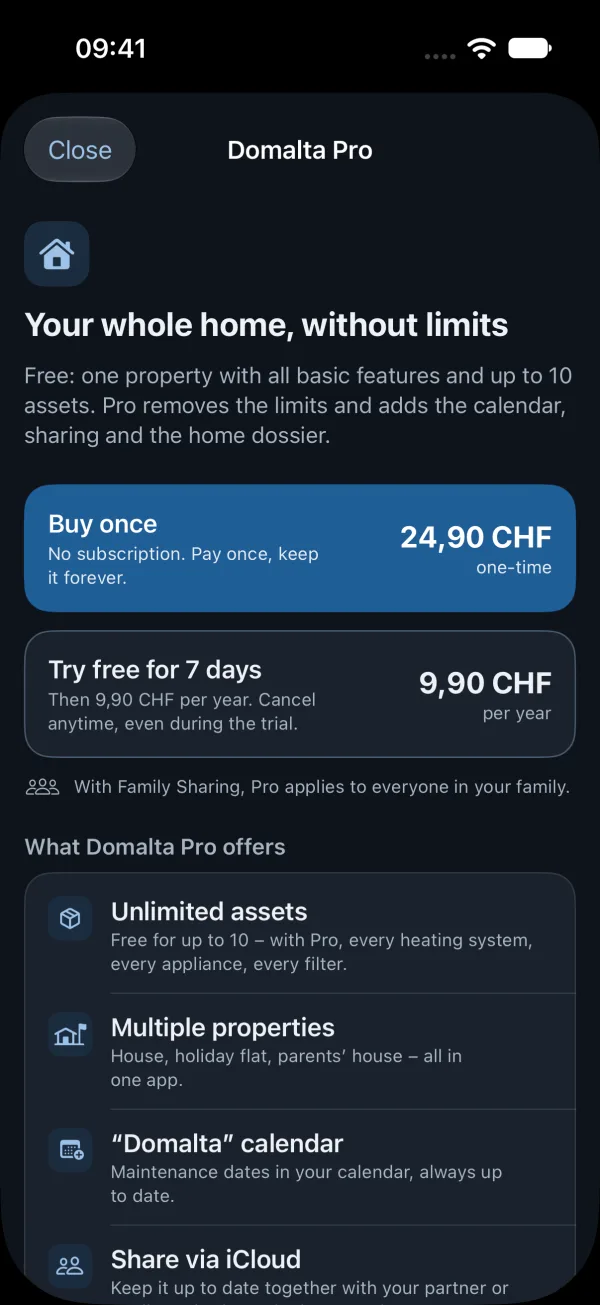
Domalta Pro offer: buy once or try 7 days free and then subscribe yearly, followed by the benefits unlimited assets, several properties, “Domalta” calendar and sharing via iCloud

08 / Free and Pro

Free for your home.
Pro when there’s more.

With one property of your own and up to ten assets, Domalta is free – with all basic features, reminders, widgets and Siri. Pro pays off when you look after your home together, record all of it or pass it on.

  • Look after it together: share the property with your partner or family. It stays free for those you invite.
  • The whole house: unlimited assets and further properties, such as a holiday flat or your parents’ house.
  • Pass it on: the home dossier as a PDF – for a sale, a handover, an inheritance or your insurer.
  • Labels for the whole house: print whole QR sheets, a CSV list for your label printer, write NFC tags.
  • In your calendar: upcoming maintenance in the “Domalta” calendar, next to your appointments.

One-off purchase or annual subscription with 7 days free, shared with everyone in your family through Family Sharing – in Switzerland CHF 24.90 once or CHF 9.90 a year; elsewhere the App Store shows the price in your currency. If Pro ends, everything is kept.

09 / Contact

Questions or ideas?
Write to us.

feedback@domalta.app

It helps to include your device, system version and the version shown under Settings › About Domalta. How Domalta handles your data is explained under Privacy.